##### Collaborative Lesson Development!
<!-- Put the link to this slide here so people can follow -->
slides: https://codimd.carpentries.org/p/B_E_Gw_8-#/
---
#### Welcome!
Congratulations on your lesson proposal being selected for the Lessons for Librarians in Open Science

---
#### Who are we?
- Tim Dennis :fleur_de_lis: , Program Director
- Zhiyuan Yao :world_map:, Program Coordinator
- Hyerin Lee :smile:, Lesson Infastructure Developer
- Lawrence Lee :sun_with_face:, Lesson Infastructure Developer
- Loretta Hu :smile:, Lesson Infastructure Developer
---
#### Carpentries Lesson Development Lifecycle
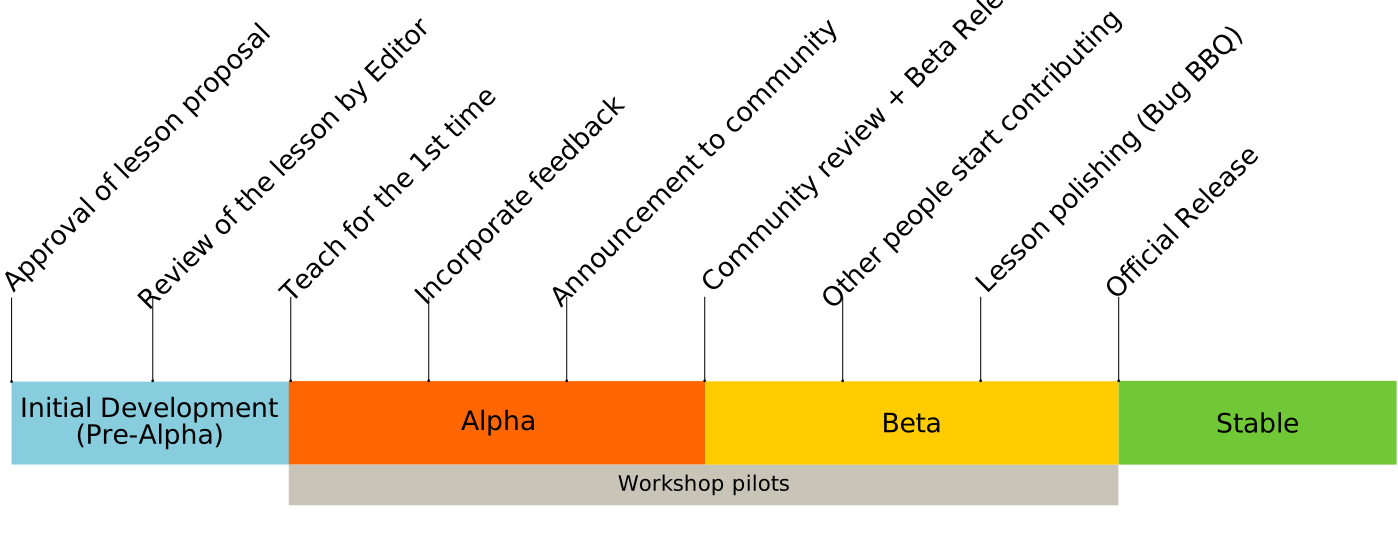
Source: <https://cdh.carpentries.org/the-lesson-life-cycle.html>
---
#### Goal for your lessons

Note:
* We don't expect a "finished" lesson
* We want a teachable lesson
* In the Carpentries template (Workbench)
* In a place that can be collaborated on and further developed
---
#### Roadmap Draft
| <!--- --> | <!-- --> |
| -------- | -------- |
| **1.** Lesson development workshop (Aug.-Oct. 2023) | **5.** Add lessons to Carpentries Incubator (Oct. 2023-Jan. 2024) |
| **2.** Build lesson with Carpentries Workbench (Aug.-Oct. 2023) | **6.** Continued development in incubator (Oct.-Jan. 2024) |
| **3.** Pilot lesson to your author group (or us) (Oct. 2023) | **7.** Taught by community (someone other than you) (2024) |
| **4.** Feeback and improvements (Oct. 2023) | **8.** Library Carpentry lesson adoption (late 2024/early 2025) |
Note:
* Lessons will be built in our UCLA-IMLS github organization, you all will be invited to that
* We'd like the lessons to visible on that org after mid-October in alpha (this is common in the carpentries)
* We can move to Carpentries Incubator anytime after that - we'll coordinate with authors
* After Jan. all lesson will be moved. We can talk about your roles, e.g. do you want to be a maintainer
---
#### UCLA-IMLS Support
Lesson Infrastructor Developers (and Zhyiuan & Tim) can help with and meet on:
* Capentries Workbench (set up, fixing configurations)
* RStudio setup
* GitHub/Git (set up & config)
* Mapping content to tempate (Carpentries Workbench)
* Adding content to the template
Note:
* Since we will be working in a GitHub organization we control, we can help at the code level
* We'll have a calendly where you can meet with us in good TZ coverage
---
### Questions - before we move on to the workshop
---
### Collaborative Development Worshop
---
>Our First Exercise (10 minutes)
>What was the best lesson you ever followed (were taught in a class, read through online, read in a book)? Try to differentiate between what was good about the performance of the teacher/trainer and what was good about the content of the lesson itself. Take a few minutes to write down some notes about your answer, then introduce yourself to the other participants and tell them about it.
---
### Workshop goals
* This workshop teaches **good practices** in lesson design and development, and open source collaboration skills.
* The training is best suited to groups of trainees who want to collaborate on a lesson project, but efforts have been made to also cater idividual authors.
---
**This training covers topics such as**:
* Identifying and characterizing the target audience for a lesson
* Defining SMART learning objectives
* Explaining the pedagogical value of authentic tasks
* Creating exercises for formative assessment
* Explaining how considerations of cognitive load can influence the pacing, length, and organisation of a lesson
Note:
SMART - Specific, Measurable, Attainable, Realistic & Timely
---
**The technical training**:
* Uses [The Carpentries Workbench](https://carpentries.github.io/workbench/), an open source lesson infrastructure that helps instructors create and publish lessons.
* Is hands-on, so you will have the opportunity to apply the principles you learn by building your lessons as we work through the content.
Source:
* [carpentries.github.io/lesson-development-training](https://carpentries.github.io/lesson-development-training)
---
### Week 1: Lesson Design/Audience
---
#### Lesson Design Process
Note:
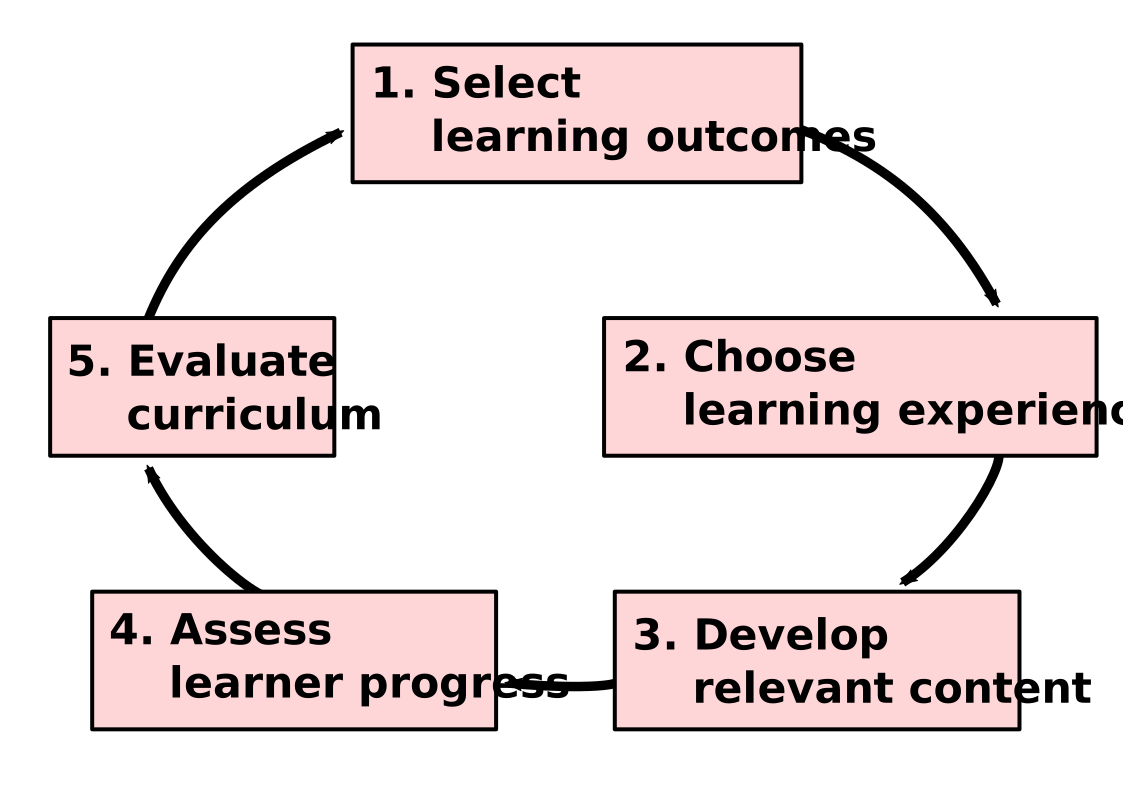
* **Backward design** is a process for curriculum design that starts with the end in mind.
* **Nicholl's five phase paradigm** is a modified version of backward design that breaks the process down into five phases:
* **Define learning outcomes**. What do you want your learners to be able to do after they have completed the lesson?
* **Select content**. What content do you need to teach in order for your learners to achieve the learning outcomes?
* **Design learning activities**. How will you help your learners acquire the knowledge and skills they need to achieve the learning outcomes?
* **Assess learning**. How will you measure whether your learners have achieved the learning outcomes?
* **Reflect and revise**. How can you improve the lesson based on your assessment of learning?
---
#### Lesson Design Process (Adapted)
Note:
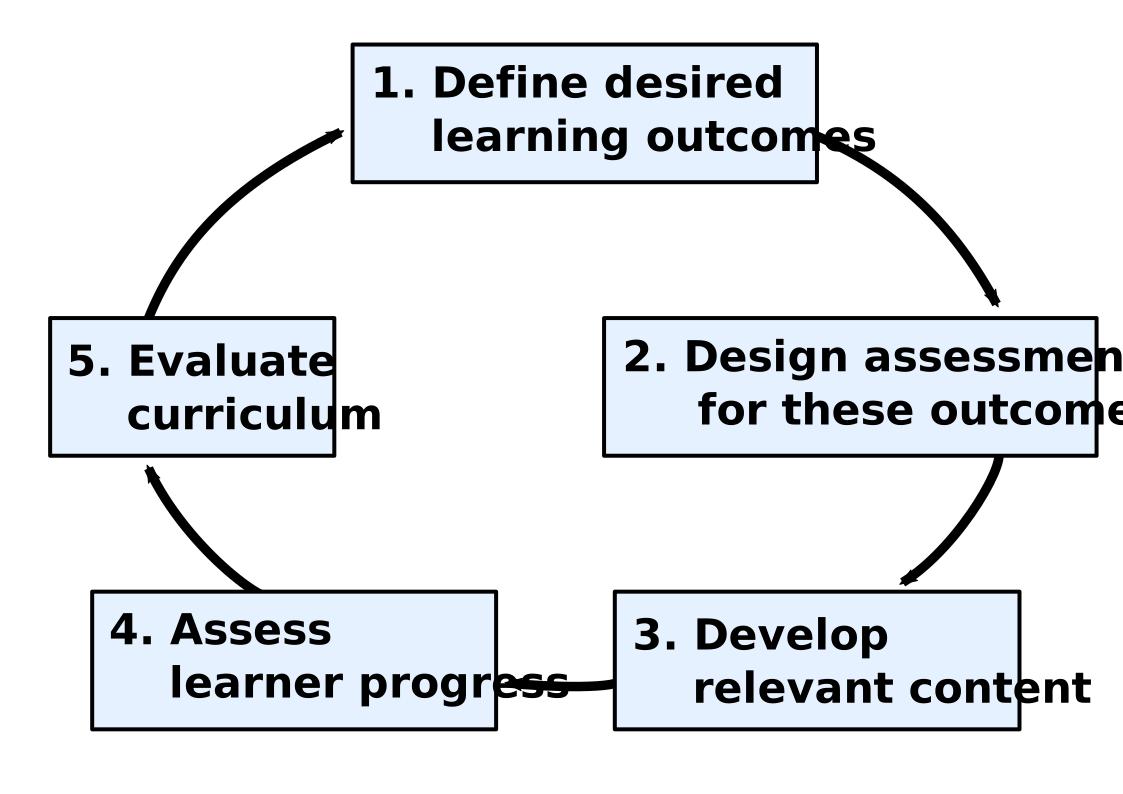
* In The Carpentries, most workshops are relatively short-format, so there is not enough time for extensive summative assessment.
* Instead, The Carpentries places an emphasis on formative assessment, which takes place while the teaching is still going on.
* Formative assessment gives instructors the opportunity to evaluate the teaching and lesson content before the end of the workshop.
* This allows instructors to make adjustments to the lesson as needed, ensuring that learners are on track to achieve the learning outcomes.
---
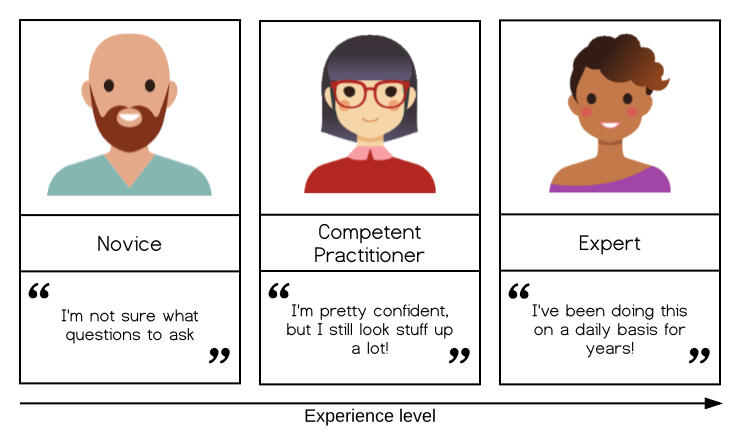
### Identifying Your Target Audience
#### :female-astronaut: :book: :person_with_ball: :bulb:
---
---
### Week 2: Learning Objectives
Note:
* At this stage of the training, you should have a clear idea of who the target audience is for your lesson, and what knowledge, skills, and abilities you expect them to arrive with.
* Now it is time to consider the additional knowledge, skills, and abilities they will have by the time they leave: these are the learning outcomes of your lesson.
* It can feel strange to jump from one end of the process to the other like this, but clearly defining your goals early in the lesson development process is vital.
* As we will see in this episode, it helps you to determine the activities, examples, etc. that are appropriate for the lesson content, and provides a scope for what should and should not be included.
---
#### Focus on Skills
* Ensure your audience stays motivated and your lesson feels relevant by focusing on teaching skills rather than tools.
* Lessons should be centered around what you are empowering learners to do, what will be most beneficial to them, rather than a list of functions or commands you are teaching them to use.
* Emphasizing skills over tools will help you prioritize key concepts and consider how your lesson can impact learners' work.
---
**Learning Objectives**
* When designing a lesson, it's important to have clear learning objectives that focus on teaching new skills.
* These skills should be cognitive in nature, as lessons that involve physical skills (woodworking, making sushi) are better suited for other learning environments.
* Learning cognitive skills requires the ability to remember and distinguish new concepts before being able to apply and create new things.
* It's important to note that remembering and distinguishing are typically easier to learn than applying and creating.
* Defining lesson objectives is crucial to focus on developing necessary content for learners to achieve their goals and avoid distractions or missing important points.
---
### What Does an Objective Look Like?
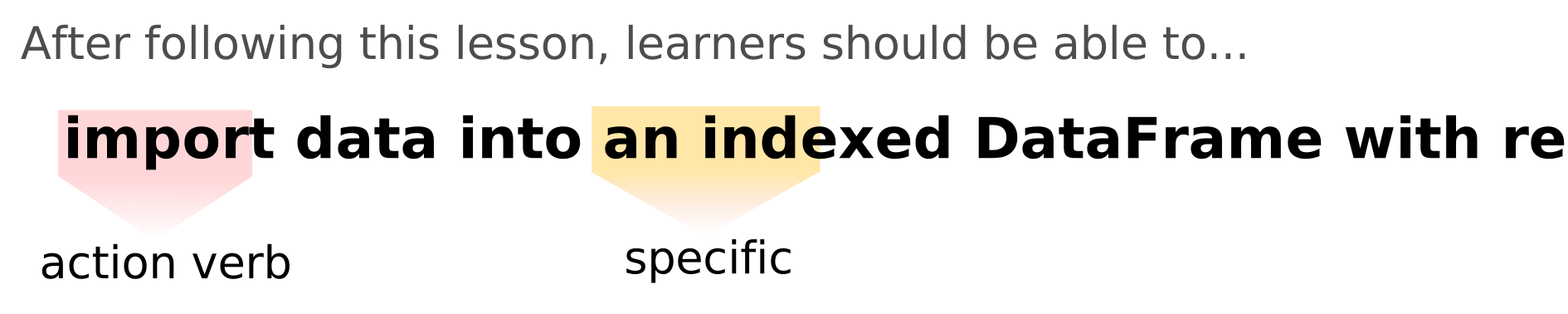
Note:
* Objectives can be defined for a lesson as a whole - what should learners be able to do at the end of a workshop teaching this lesson?
* and for individual sections within it - what should learners be able to do after following this particular part of the lesson?
---
**Objectives for the current section of this training:**
>1. Explain the importance of defining specific, measurable, attainable, relevant and time-bound objectives for a lesson.
>2. Evaluate a written lesson objective according to these criteria.
---

---
**Learning Objectics**
* **Learning objectives** can be defined for a lesson as a whole or for individual sections within it.
* Each objective should start with a **verb and describe one (and only one) skill** the learner will obtain.
* The skills described by the objectives should be **measurable**.
* **Action verbs** such as "explain," "choose," or "predict" are more helpful than passive verbs such as "know," "understand," or "appreciate."
* **[Bloom's Taxonomy](https://cft.vanderbilt.edu/guides-sub-pages/blooms-taxonomy/)** is a useful aid for defining learning objectives.
* Learning objectives should be written in a way that is **motivating to the learner**.
---
**SMART objectives should be:**
* **Specific**: they should clearly describe a particular skill or ability the learner should have.
* **Measurable**: it should be possible to observe and ascertain when the learner has learned the skill/abilities described in the objectives.
* **Attainable**: the learner should realistically be able to acquire the skills or abilities in the time available in a workshop/by following the text of the lesson.
* **Relevant**: they should be relevant to the overall topic or domain of the lesson as a whole.
* **Time-bound**: they should include some timeframe within which the goal will be reached. For learning objectives, this is built into the approach described above.
---
### Exercise: evaluating learning objectives (15 minutes)
<https://codimd.carpentries.org/F6-odI4qSNa4e_Zlkrwd1Q?view#Exercise-evaluating-learning-objectives-15-minutes>
---
**Lesson Scope**
* Refers to the amount of content that should be included in a lesson.
* Avoid trying to fit too much content into a lesson, as this can be counterproductive.
* When writing learning objectives, it is helpful to consider the **order in which new skills must be acquired**.
* **Higher-level cognitive skills** take longer to acquire, so it is unrealistic to aim to have learners completing creative tasks before the end of the lesson.
* Lessons can be broadly considered as blocks of content associated with a **particular learning objective**.
---
**Exercise: defining objectives for your lesson (20 minutes)**
**Exercise: reviewing lesson objectives (15 minutes)**
---
#### Week 3: Carpentries Workbench and Defining Episode Objectives
#### Review
- You are clear about your audience
- You are clear about what skills you want your audience to learn
- You defined specific and realistic overall lesson objectives and outcomes (at least thought about them).
It is time to begin creating a website that will present that lesson to the world!
---
### Objectives:
- Identify the key tools used in The Carpentries lesson infrastructure.
- Complete the fundamental setup steps for a new lesson repository.
- Edit Markdown files using the GitHub web interface and locally.
- Define learning objectives for a section of a lesson.
- Format objectives in the individual pages of a lesson website.
---
### Github Pages
The source of all The Carpentries lessons is made publicly-available in repositories on [GitHub](https://github.com/).
Lets have a poll here. How do you rate your levels of experiences with Github.
- if you are familiar with it, give us a :smile:
- if you are not familar with it, give us a :hearts:
Note: if you have not given us your github account, please add it here. We would like to invite you to our organization, and you will creat your lessons there first.
---
### Github page
[GitHub Pages](https://pages.github.com/), users can build and host websites from the files present in any repository on GitHub. For many years, this has been how The Carpentries presents its lesson websites to the world.
<img src = 'https://rhiannon.io/assets/img/githubpages.jpg' width = 500>
---
## Carpentries Workbench
Carpentries lesson websites are built with [The Carpentries Workbench](https://carpentries.github.io/workbench/), a toolkit that converts Markdown and RMarkdown files into the HTML that can be served by GitHub Pages. We will use it now to initialise a new lesson.
The lessons are built using a programming language, ***R***, and ***pandoc***, a software designed for converting content between file formats. The Workbench combines three R packages:
---
- [sandpaper](https://carpentries.github.io/sandpaper/): converts a collection of Markdown or RMarkdown files into the structure of a lesson website.
- [varnish](https://carpentries.github.io/varnish/): provides the files and folders that add styling and additional functionality to a lesson website.
- [pegboard](https://carpentries.github.io/pegboard): a programmatic interface to the lesson, enabling various automated validation tasks.
---
### Creating a Lesson Repository
**A QUICK CHECK:**
Are you in [ucla-imls-open-science](https://github.com/ucla-imls-open-sci) organization?
<div style="text-align: left"> There are currently two templates to choose between:
- [A Markdown template](https://github.com/carpentries/workbench-template-md/generate)
- [An RMarkdown template](https://github.com/carpentries/workbench-template-rmd/generate), best suited to lessons you expect to include R source code that will generate output.
HANDS-ON practice. </div>
---
**PRACTICE WITH config.yaml (5 MINUTES)**
Complete the configuration of your lesson by adjusting the following fields in config.yaml:
- **email**: add an email address people can contact with questions about the lesson/project.
- **created**: the date the lesson was created (today’s date) in YYYY-MM-DD format.
- **keywords**: a (short) list of keywords for the lesson, which can help people find your lesson when searching for resources online.
- **source**: change this to the URL for your lesson repository.
We will revisit the life_cycle and carpentry fields in config.yaml later in this training.
---
**IMPROVING THE README.md (5 MINUTES)**
Take a few minutes to update it with some basic information about the project:
- the lesson title
- a short description of the lesson
- a list of the names of the authors, optionally linked to their GitHub profile
---
**EXERCISE: PRACTICE CREATING EPISODES (10 MINUTES)**
> Repeat the steps you just saw, to create another new episode file and add it to the lesson site navigation. If you know what another episode in your lesson will be about, create the page for that. Otherwise, feel free to use any values you like for the file name and episode title.
---
### Defining Episode Objectives
**SMART objectives should be:**
- Specific: they should clearly describe a particular skill or ability the learner should have.
- Measurable: it should be possible to observe and ascertain when the learner has learned the skill/abilities described in the objectives.
- Attainable: the learner should realistically be able to acquire the skills or abilities in the time available in a workshop/by following the text of the lesson.
- Relevant: they should be relevant to the overall topic or domain of the lesson as a whole.
- Time-bound: they should include some timeframe within which the goal will be reached. For learning objectives, this is built into the approach described above.
---
Defining these objectives before writing the episode content helps us to:
- stay focused in the episode, without spending time on non-essential topics
- determine whether learners are attaining the skills we wish to teach them (we will discuss this more in the next two episodes)
- summarise the skills the learner can expect to gain by following this section of the lesson
---
**EXERCISE: DEFINE OBJECTIVES FOR YOUR EPISODE (30 MINUTES)**
1. Using the same approach as you did for your whole-lesson objectives, define a set of SMART objectives for your chosen episode. (15 minutes)
2. Add this list of objectives to replace the TODO in the objectives fenced div of your episode file (5 minutes)
3. Compare your list with those created by your collaborators on the lesson:
are there any gaps in these objectives, i.e. anything that should be covered in these episodes but is not captured in the objectives?
are there any overlaps, i.e. anything that looks like it will be covered more than once?
4. As a group, discuss how you will address any problems identified in the previous step, and edit your objectives accordingly.
---
**MORE PRACTICE WITH FENCED DIVS (OPTIONAL)**
The Carpentries Workbench provides another type of fenced div, prereq, that can be used to create a block highlighting the preprequisites for a lesson.
Use one of these prereq fenced divs to format the list of prerequisite skills you added to your index.md file earlier.
---
## Week 4
---
## Today: Recap, Check-in and Episode LOs
* Do you want to go back over any parts of the Workbench?
* Add content we have developed so far to the template.
* We can help in the following way:
* Set up and configuration of the lesson repo.
* Populate lesson content in the right places.
---
### Getting help from our team :high_brightness:
* Reach out to Lawrence, Hyerin, or Loretta for help on Slack
* Can be getting started configuration or help writing over content
* Set up a meeting
* <https://calendly.com/imls-open-science-team/meet-with-the-ucla-imls-team>
* If you are comfortable, we can work through GitHub Issues and PUll Requests
---
## Exercise: Improving the README.md (5 minutes)
Take a few minutes to update it with some basic information about the project:
* the lesson title
* a short description of the lesson
* a list of the names of the authors, optionally linked to their GitHub profile
---
#### Exercise: Adding your learning objectives to `index.md` (5m)
If you are in a group, pick an author and have them add the objectives you defined for your lesson as a bullet list in the `index.md` file of your lesson repository. Looks like so:
```
## Learning Objectives
After attending this training, participants will be able to:
- collaboratively develop and publish lessons using The Carpentries lesson infrastructure
(aka [The Carpentries Workbench][workbench]):
lesson template, GitHub, GitHub Pages, etc.
- identify and characterise the target audience for a lesson.
- define SMART learning objectives.
```
---
### Lesson LOs and Episode LOs
- Lesson objectives set end goals and scope of the lesson.
- Similarly, we define objectives for individual lesson episodes.
- Objectives for episodes aid in staying focused, excluding non-essential topics.
- Help assess if learners are acquiring intended skills.
- Summarize skills learners gain from each lesson section.
---
#### Creating a new episode (copy and paste way)
Let’s create a new episode file, for one of the episodes you have just identified.
1. First, open the “raw” view of the `introduction.md` example episode, and copy the first 19 lines, down to the blank line under the closing string of the objectives div.
2. Now create a new markdown file in the episodes folder and, based on the episodes you planned out in Defining lesson objectives, choose a name for it that concisely describes the intended content, e.g. `data-visualisation.md`.
---
#### Exercise: define objectives for your episode (20 minutes)
1. Using the same approach as you did for your whole-lesson objectives, define a set of SMART objectives for your chosen episode. (15 minutes)
2. Add this list of objectives to replace the TODO in the objectives fenced div of your episode file (5 minutes)
---
## Week 5: Designing Assessments
---
### Assessments
- **summative assessments** - used to verify whether learners achieved the stated learning objectives after instruction.
- **formative assessments** - used to detect changes in learner performance *during* instruction, to provide feedback and insight into the learners' developing mental models of the topic taught and to identify any old or developing misconceptions.
---
**Exercises** are one important type of formative assessment.
Note:
- we will now have a look into exercises that perform misconception checks and ask students diagnostic questions;
- we will cover a few other types of exercises that help with retaining new knowledge in one of the later episodes.
---
### Detecting Misconceptions
- Detecting and correcting misconceptions is as vital as presenting accurate information.
- Misconceptions can slow down learning.
- Prolonged use of incorrect mental models hampers new learning.
- Existing misconceptions can interfere with incorporating correct knowledge.
---
### Exercise: misconceptions (5 minutes)
1. What are the common misconceptions learners can have about the topic of your lesson?
2. How might you identify that misconception in your learners while they follow your lesson? Share your answer in the [CodiMD](https://codimd.carpentries.org/F6-odI4qSNa4e_Zlkrwd1Q?both).
3. Hint: Try thinking about related or common tools the learners might know and howapplying that prior knowledge might lead to a misconception with the topic you are teaching.
---
**Exercise MCQ with plausable disctractors & diagnostic power**
**Question: What does "Open Science" refer to?**
- A) Keeping research findings confidential.
- B) Sharing research findings with a select group of colleagues.
- C) Making research methods, data, and findings accessible to the public.
- D) Conducting research without any collaboration.
Note:
In this example, option C is the correct answer, representing the concept of Open Science where researchers make their research process, data, and findings openly accessible to the public. The incorrect answer choices (A, B, and D) could reflect common misconceptions about what Open Science entails. This type of question can help identify learners' understanding of the Open Science concept and address any misconceptions they might have.
**Diagnostic Power of Wrong Choices:**
- Incorrect answer choices in assessments help instructors identify learners' misconceptions.
- Pinpoints where mental models are broken.
- Guides instructors to review concepts or adjust instruction pace.
---
**Designing Diagnostic Assessments:**
- Think of problems or questions from past training events.
- Consider your own past misconceptions or consult colleagues.
- Create assessments before explanatory content (backwards design).
- Guides lesson design based on expected learner knowledge at each point.
---
### Exercise: designing a diagnostic exercise (20 minutes)
1. Create a multiple choice question (MCQ) that could be used in your lesson, to detect the misconception you identified above.
2. As well as the correct answer, include 1-3 answer options that are not obviously incorrect (*plausible distractors*) and have *diagnostic power* i.e. each incorrect answer helps you pinpoint the exact misconception carried by the learner.
3. Share your MCQ in the CodiMD after your name.
---

---
* **Memory model:** LTM (unlimited, slow) / WM (limited, quick).
* **Goal in teaching:** Transfer to LTM.
* **Exercises:** Aid transfer, practice, assess, identify, reinforce.
* **Benefits of exercises:** Frequent exercises free up WM for new content.
* **Action verbs:** Guide exercise design (e.g., explain/describe, solve/construct/test).
Note:
* **Memory model:** The human memory system is often divided into two main components: working memory (WM) and long-term memory (LTM). WM is a temporary storage system that can hold a limited amount of information for a short period of time. LTM is a more permanent storage system that can hold a virtually unlimited amount of information.
* **Goal in teaching:** The goal of teaching is to help students transfer information from WM to LTM. This can be done through a variety of methods, including exercises, practice, and repetition.
* **Exercises:** Exercises are a valuable tool for helping students transfer information to LTM. They can help students practice new concepts, identify misconceptions, and receive feedback on their learning.
* **Benefits of exercises:** Frequent exercises in lessons can help to free up WM for new content. This is because exercises can help students to consolidate information in LTM, which frees up WM to be used for new learning.
* **Action verbs:** Action verbs are verbs that describe specific actions or tasks. They can be used to guide the design of exercises. For example, the action verb "explain" could be used to design an exercise that asks students to explain a new concept in their own words.
---
* **Learning objectives:** Varies by level (novice, practitioner, expert).
* **Exercise types:** Match objectives (cognitive load management for novices).
* **Novices:** Benefit from guided exercises (specific concepts).
* **Limits:** Higher-level skill development (functions/scripts, extrapolation).
* **Formats:** Depend on objectives and audience.
* **Alignment:** Crucial.
Note:
* **Learning objectives:** The learning objectives for a particular topic or skill will vary depending on the learner's level of experience. Novices may need to focus on learning the basic concepts, while practitioners may need to focus on applying those concepts to real-world problems. Experts may need to focus on developing new skills or techniques.
* **Exercise types:** The type of exercise that is most effective for a particular learning objective will also vary depending on the learner's level of experience. Novices may benefit from exercises that help them to manage their cognitive load, such as faded examples or Parsons problems. Practitioners may benefit from exercises that allow them to apply their knowledge to real-world problems. Experts may benefit from exercises that challenge them to develop new skills or techniques.
* **Novices:** Novices are learners who are new to a particular topic or skill. They may have a limited understanding of the concepts and may need a lot of support to learn. Guided exercises that focus on specific concepts can be helpful for novices. These exercises can help them to master the basic concepts before they move on to more complex material.
* **Limits:** Novices' exercises should limit higher-level skill development, such as creating new functions/scripts or problem extrapolation. This is because novices may not have the necessary knowledge or skills to complete these types of exercises successfully.
* **Formats:** The format of an exercise can also vary depending on the learning objective and the learner's level of experience. For example, a novice may benefit from a hands-on exercise, while a practitioner may benefit from a more theoretical exercise.
* **Alignment:** It is important to align the learning objectives, the exercise types, and the exercise formats. This will ensure that the exercises are effective in helping learners to achieve their learning goals.
---
>"Different types of lesson objectives (LOs) are better fit for novices, while others are better fit for competent practitioners, etc. and if exercises (formative assessments) are well aligned to LOs, [they] will automatically serve the corresponding audience. Thinking in terms of LOs (What should a learner do in order to achieve this specific LO? Is this LO exactly what learners are expected to achieve by the end of this piece of instruction? etc.) is easier than thinking in terms of LOs + audience + content. LOs should be tailored to the audience, and, if this is well done, you may stop worrying about the audience. Create LOs for the specific audience and create assessments for specific LOs."
>- Dr. Allegra Via, Carpentries Instructor Trainer
---
## Exercise: Assessing an Objective (30 minutes)
1. Look at the following examples of different formative assessment for 5 min:
- [Exercise Types Chapter from Teaching Tech Together](https://teachtogether.tech/en/index.html#s:exercises) (more technical/coding in nature)
- [Edutopia's 56 Examples of Formative Assessment](https://www.edutopia.org/groups/assessment/250941)
- [H5P Examples and Downloads for Interactive Content](https://h5p.org/content-types-and-applications)
2. Then, using one of the exercise formats you have learned about so far, design an exercise that will require learners to perform one of the actions described in the objectives you wrote for your lesson, and that assesses their ability to do so.
3. If you feel comfortable with adding the exercise to the lesson you can now. See the format below
---
How a **challenge** is implemented:
```
:::::::::::::::::::::::::::::::::::::: challenge
### Challenge Title
Challenge text, code, and other information goes here
::::::::::::::::::::::::::::::::::::::::::::::::::
```
---
With a solution:
```
:::::::::::::::::::::::::::::::::::::: challenge
### Challenge Title
Challenge text, code, and other information goes here
:::::::::::::: solution
### Solution Title
Solution text, code, and other information
:::::::::::::::::::::::::
::::::::::::::::::::::::::::::::::::::::::::::::::
```
---
* Demo:
```
:::::::::::::::::::::::::::::::::::::: challenge
### Exercise: What does "Open Science" refer to?
- A) Keeping research findings confidential.
- B) Sharing research findings with a select group of colleagues.
- C) Making research methods, data, and findings accessible to the public.
- D) Conducting research without any collaboration.
:::::::::::::: solution
### Solution: What does "Open Science" refer to?
In this example, option C is the correct answer, representing the concept of Open Science where researchers make their research process, data, and findings openly accessible to the public. The incorrect answer choices (A, B, and D) could reflect common misconceptions about what Open Science entails. This type of question can help identify learners' understanding of the Open Science concept and address any misconceptions they might have.
:::::::::::::::::::::::::
::::::::::::::::::::::::::::::::::::::::::::::::::
```
---
## Exercise: Formatting Exercises in a Lesson Site (15 minutes)
Using the approach demonstrated above, format the MCQ you designed previously as an exercise in your lesson site.
---
## Exercise: More Practice with Fenced Divs (10 minutes)
Return to the bulleted list of prerequisite knowledge or skills you added to the index.md file of your lesson and use fenced divs to display it in a formatted box with the prereq class. Note that all lesson objectives in fenced divs will be combined into one box at the top of each episode.
---
## Homework:
1. Write other formative assessments for your learning objectives.
2. Add your challenge to the lesson episode using fenced divs.
---
### Where we are in the lesson development lifecycle
<img src = 'https://codimd.carpentries.org/uploads/upload_42cf275bbf3acbadcd35c0ee4c256a88.svg' width = 600>
---
### From Example Data and Narrative
- Writing a lesson as a story helps learners stay motivated and engaged.
- The story can help learners connect the skills they are learning now to their own work.
- Images and figures can enhance the narrative, but be sure they are consistent with the situation you are describing.
---
### From Example Data and Narrative
- Including a dataset can help maintain a narrative flow and make the lesson feel more authentic.
- Deciding on a consistent narrative will help create a flow between lessons and reduce cognitive load for learners.
---
### Examples of Public Repositories -
<div style = 'text-align: left'>When looking for data to reuse, consider public repositories in the subject area for your lesson or general data repositories such as:
[Dryad](https://datadryad.org/)
[The Data Curation Network’s datasets](https://datacurationnetwork.org/datasets/)
[The Offical Portal for European Data](https://data.europa.eu/)
[DataONE](https://www.dataone.org/)
[The Official Portal for Argentina Data (in Spanish)](https://www.datos.gob.ar/)
[LANFRICA](https://lanfrica.com/)</div>
---
### Week 6: How to write a lesson
After completing this episode, you should be able to…
- Estimate the time required to teach a lesson.
- Summarise the content of a lesson as a set of questions and key points.
- Connect the examples and exercises in a lesson with its learning objectives.
---
### Writng Explanatory Text
- <span style="font-size : 25pt;">Explanatory text helps connect your examples and exercises together into a cohesive lesson. </span>
- <span style="font-size:22pt;color:blue"> run sandpaper::serve(). Explanatory text: this function bulids the website and shows you preview. It will re-run everytime after you edit and save. </span>
- <span style="font-size:25pt;"> How much text to include is often a question of personal style while balancing the needs of potential users, both other instructors and learners.</span>
- <span style="font-size:22pt;color:blue">There are trade-offs to consider when preparing a site for use as an instructional guide vs use as a self-directed learning resource.</span>
---
### Exercise 1
LESSON TIME MANAGEMENT (10 MINUTES)
(5 minutes) In the shared notes document, note down your answers to these questions:
- From a design perspective, at what point is a lesson too long?
- What factors influence and constrain the length of a lesson?
- How might you prioritise what to keep if you have to cut lesson content down?
(5 minutes) Discussion based on the responses.
---
### Less is more
Trying to fit too much content into a lesson is counter-productive. It is better to cover less and provide a smaller but stable foundation for learners to build upon.
---
As you consider the length of your lesson discuss with your collaborators and ask yourself:
- What is essential to include?
- What can be left out if needed?
- Are there checkpoints where the lesson could end if needed?
- Can important concepts be moved up earlier to ensure they are covered?
---
In the end, the only way to know for sure is to teach the lesson, measuring how long it takes to teach.
If, after piloting your new lesson, you find that you did not have time to cover all the content, approach cutting down the lesson by identifying which learning objectives to remove.
---
You may consider making [a concept map](https://carpentries.github.io/instructor-training/02-practice-learning.html#mapping-a-mental-model) to help identify which objectives depend on one another.
Alternatively, if you decide to keep certain objectives in the lesson, you can add suggestions on which objectives can be skipped to the Instructor Notes for the lesson.
---
### Other Important Considerations for Lesson Text
- [dismissive language](https://carpentries.github.io/instructor-training/04-expertise.html#just-and-other-dismissive-language) - e.g. ‘simply’, ‘just’
- use of [stereotypes](https://carpentries.github.io/instructor-training/04-expertise.html#just-and-other-dismissive-language) (check learner profiles for stereotypes too)
- [expert awareness gaps](https://carpentries.github.io/instructor-training/04-expertise.html#mind-the-gap), i.e. places where you may be assuming the learners know more than they actually do
- fluid representations, i.e. using different terms with the same meaning interchangeably
---
### Other Important Considerations for Lesson Text
- unexplained or unnecessary jargon/terminology (as your learners may come from different backgrounds, may be novices, not native English speakers, and a term in one domain/topic may mean something else entirely in another)
- unexplained assumptions
- sudden jumps in difficulty/complexity
---
You should also review your text thinking about accessibility. This includes:
- Avoiding regional/cultural references and idioms that will not translate across borders/cultures
- Avoiding contractions i.e. don’t, can’t, won’t etc.
---
- Checking that all figures/images have well written alternative text, including [writing altnerative text for data visualizations.](https://medium.com/nightingale/writing-alt-text-for-data-visualization-2a218ef43f81) An alternative text contains an invisible description of an image which is read aloud to blind users by screen readers providing alternative text-based format for images. See [the Workbench documentation for directions on how to add alternative text and captions to images in a lesson](https://carpentries.github.io/sandpaper-docs/episodes.html#figures)
---
- Checking the header hierarchy - no h1 headers (single pond # in Markdown) in the lesson body, no skipped levels
- [Using descriptive link text](https://carpentries.github.io/sandpaper-docs/episodes.html#figures) - no “click here” or “this page”, etc.
- [Checking the text and foreground contrast for images](https://contrastchecker.com/)
---
### Exercise 2
EXERCISE: ALTERNATIVE TEXT FOR IMAGES (5 MINUTES)
Which of the following is a good alt-text option for the image below?
Line graph of increasing carbon dioxide at the Mauna Loa Observatory from 1958 to present.
---
<img src = 'https://codimd.carpentries.org/uploads/upload_925cad1b33dd93528f892c8021d9df8e.png' width = 400>
<span style ='font-size:12pt'>Atmospheric Carbon Dioxide at Mauna Loa Observatory</span>
<span style ='font-size:12pt'>1. Graph of data</span>
<span style ='font-size:12pt'>2. Graph with increasing lines</span>
<span style ='font-size:12pt'>3. Line graph of increasing carbon dioxide in ppm at the Mauna Loa Observatory from 1958 to present</span>
<span style ='font-size:12pt'>4. Line graph of increasing carbon dioxide in ppm at the Mauna Loa Observatory, Hawaii, United States, from 1959 to present including values from each year. Red line shows variation in each year and black line is average for each year. 1959 = 315.90 ppm, 1960 = 316.91, 1961 = 317.64 …</span>
---
### Polishing a lesson
[The checklist for lesson reviewers in The Carpentries Lab](https://github.com/carpentries-lab/reviews/blob/main/docs/reviewer_guide.md#reviewer-checklist) is a useful guide for polishing the design and content.
---
**Revised Schedule: <https://codimd.carpentries.org/F6-odI4qSNa4e_Zlkrwd1Q?view#Schedule>**
* We will poll everyone next week to see if you need more time to focus and write
* Based on responses we will triage the remaining weeks
---
REFLECTION EXERCISE (20 MINUTES)
We have reached the end of the time you have to work on the episodes of your lesson in this training. This exercise provides you with a chance to look back over everything you have sketched out for your episode and the lesson as a whole and consider what still needs to be done before it can be taught.
You can use this time however you judge will be most beneficial to your preparations for teaching your episode in a trial run.
---
If you are not sure how to start, consider mapping out the relationships between the objectives of your episode and the examples and exercises via which they will be taught and assessed.
---
For example,
> The read CSV and inspect demo supports Objective 2 (load a simple CSV data set with Pandas) and will be delivered using participatory live coding. The objective will be assessed with an exercise that requires learners to apply the read_csv function to another file and count the rows in the resulting DataFrame object.
---
- Does any of your planned content not support any learning objectives?
- Is there at least one piece of content planned for each learning objective?
- Is there a formative assessment planned for each learning objective?
- What do you still need to add/work on?
- What can you remove/consider removing?
- How will the narrative and example data you have chosen for your lesson support teaching and assessment?
- What diagram or other visual aids could you add to supplement your text?
---
**Revised Schedule: <https://codimd.carpentries.org/F6-odI4qSNa4e_Zlkrwd1Q?view#Schedule>**
---
**Feedback for today: <https://forms.gle/ovUmunVSX1s7Cyqn8>**
---
### Key points
- The objectives and assessments provide a good outline for an episode and then the text fills in the gaps to support anyone learning or teaching from the lesson.
- It is important to review your lesson for demotivating language, cognitive load, and accessibility.
- To reduce cognitive load and ensure there is enough time for for the materials, consider which lesson objectives are not needed and remove related content and assessments.
---
{"title":"Slides UCLA-IMLS Collaborative Lesson Dev Slides","tags":"CollabLesson, Slide, UCLA-IMLS","description":"View the slide with \"Slide Mode\".","slideOptions":{"theme":"simple"}}